
Skip to content
papers_logo
  • Pricing
  • AI Assistant
  • Resources
    • Download Center
    • Training Center
    • Help Center
    • Blog
  • Institutions
  • Enterprise
  • Log In
  • Start Trial

Help Center

  • Getting Started
  • Live Training
  • Downloads
Submit a Ticket

Getting Started

16
  • Quick Start Guide
  • Papers Desktop vs Web App
  • Revert to Papers Classic
  • Papers Pro FAQ
  • What shortcuts are presently supported
  • How to Import Content into Papers Reference Manager
  • Migrating from Mendeley to Papers
  • Importing Your Library From Endnote
  • Import From Another Reference Manager
  • How to Import Content into Your Papers Library via CSV
  • How to Add Metadata-Only References to Your Papers Library
  • Import by Use of .ris File From External Database – With PDFs and Without PDFs
  • How to Import Records from ClinicalTrials.gov into Papers
  • Article Matching (Manual and With Helper)
  • Metadata Resolving & Incomplete Records
  • How to Import Pubmed .Nbib Files Into Papers

Installation and Setup

5
  • How to toggle dark mode in the Papers desktop app
  • Papers System Requirements: What You Need to Get Started
  • Installing the Papers Desktop Application
  • How To Set Up My Institutional Proxy in Papers?
  • How to get Help/Support

Papers AI Assistant

4
  • Introduction to AI Assistant
  • Chat with PDF
  • AI Assisted Query Builder (Papers Pro)
  • Chat with your Library with AI Assistant (Papers Pro)

Browser Extension

8
  • Save to Library Feature
  • What Browser Versions Support the Papers Web App?
  • How to Import References from Web Pages and Search Results
  • How to Install the Papers Browser Extension
  • What Do the Browser Extensions Buttons Mean?
  • How to deploy the Papers Chrome extension via GPO
  • About the Extension Sidebar
  • Browser Extension on Google Scholar

Search & Discover

9
  • Full text search
  • Advanced Searching (in library)
  • Query Builder
  • Find Related Articles Using the Papers Reader
  • Introduction to Papers Query Builder
  • What are Papers Recommendations?
  • Introduction to Papers Search
  • Save searching options in Papers
  • Importing Grey Literature Into Papers

Read & Annotate

12
  • PDF Reader Overview
  • Annotation Options in the PDF Reader
  • How to View Supplementary Files in Reference Entries
  • How to Enable Dark Mode for the Reader?
  • How can I view figures in the Reader?
  • How Can I Navigate Directly From an Inline Citation to an Article/Reference?
  • How to Export PDF Notes
  • How to View an Article’s Full Reference List in the Reader
  • How to View Supplementary Information in Reader
  • Print PDF with my highlights attached
  • Enable Dark Mode for the Reader
  • How To Download the PDF Version of an Article From the Reader

Organize

13
  • Downloading PDFs/Offline Access
  • Citekey Management
  • File Management
  • How to Organize Articles in Papers: A Step-by-Step Guide
  • Papers Library View: Customizing Your Library
  • Introduction to Smart Lists
  • Introduction to Custom Fields
  • Watch Folders
  • Duplicate Merging During Import
  • Citing organizations as authors
  • Authors with multi-text names
  • CSV Import/Export
  • An Article Was Mislabelled as a Supplement (Or Vice Versa)

Collaboration

4
  • Collection not accessible
  • Introduction to Public Lists
  • What Are the Permissions of a Shared Library?
  • How Do I Create a Shared Library?

Library & Device Sync

3
  • How to Enable Additional Sources in the Papers PDF Reader
  • Syncing Your Library Offline
  • How to connect Papers with Overleaf

Mobile

2
  • Double-page PDF view in Papers mobile app
  • Papers mobile app overview

SmartCite

11
  • Vancouver citation style renamed
  • How to use footnotes with SmartCite?
  • Converting an EndNote formatted document into SmartCite
  • Introduction to SmartCite for Citekeys
  • How do I add a custom citation style to the SmartCite Add-in?
  • Converting SmartCite Citations into EndNote Friendly Format
  • Update/Change Citation Style in SmartCite
  • Customizing Inline Citations
  • Using section bibliographies in SmartCite
  • Citing organizations as authors in Papers
  • Using hyperlinks in SmartCite bibliography

Accounts & Billing

4
  • Papers Refund Policy
  • What is ReadCube?
  • Upgrade from Papers to ReadCube
  • Forgot password
View Categories
  • Home
  • Help Center
  • Organize

CSV Import/Export

Papers allows you to import or export a library as a .csv (comma-separated values) file. This format will allow you to make batch edits to your information using a spreadsheet (with software such as Excel).

What is a CSV file?

A CSV file has a fairly simple structure. It’s a list of data separated by commas. For example, if you have a few contacts in a contact manager and you export them as a CSV file, you would get a file that looks like this:

Essentially, this is all a CSV file is. They can be far more complicated with thousands of lines, a large number of entries for each line and/or long strings of text.  Some CSV files may not even have the headers at the top, and some may use quotation marks to surround each bit of data.However, this is the basic format.

What kind of CSV’s can I import?
There are many different types of CSV files and while most should work with Papers, there will be some that may not. However, most CSV’s should work if they have at least one of the following fields that are required when you import a CSV:
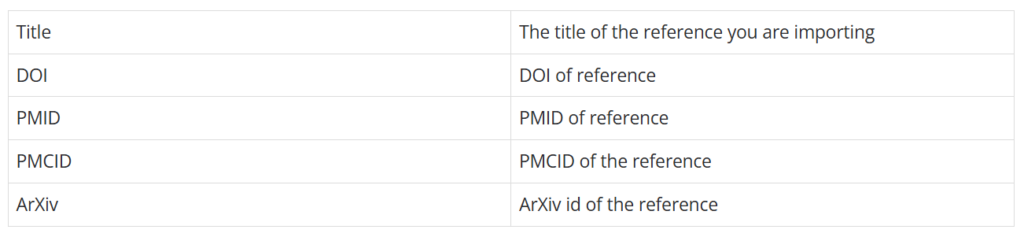
Only one of the above fields is required. This allows you to import a list full of DOI’s or some titles of references. Note that if there is no identifier (such as DOI, PMID, etc.) we won’t be able to fill in any more metadata information for you (as the app requires identifiers to search for and locate metadata information of a reference). 

For instance, the following CSV will allow you to import these DOIs and get information on them. If any of the articles are open access ones the app will automatically import the PDFs for them (from this particular example, the last article is an open access one). You can get a copy of this file at the bottom of the page (DOIExample.csv).

DOIexampleDownload

Another common CSV you might want to import is a PubMed search result. You can find this option under “Save” and by changing the format to CSV:
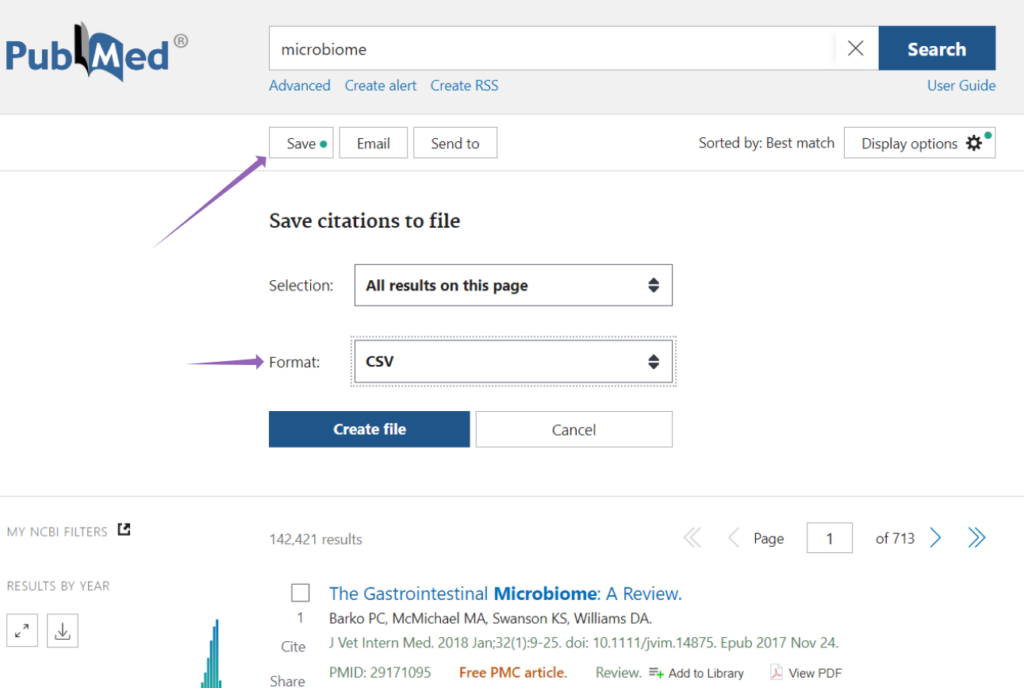
Results will be formatted like:

These have a lot more information and will import automatically into your library. To get an example of this file see below (csv-ElephantSh-set.csv).

csv-ElephantSh-setDownload

What kind of fields does the CSV file support?

Any of the fields that are part of our Advanced Search Syntax article can be imported. The length of these items can only be 256 characters long. Importing other fields will work but we currently hide these fields in the app. We will be adding a way to visualize these fields in the future.

Can I import a TSV(Or another file that has different delimiters)?

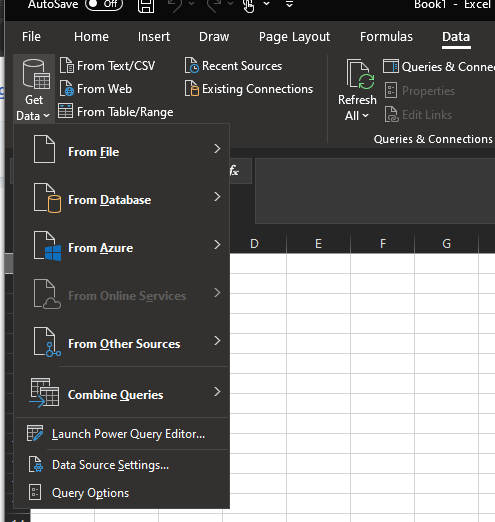
Currently, we don’t support TSV but the easiest way to fix this is to open the TSV in a program like Excel and then save it as a CSV file. This will allow you to use other file formats that use different delimiters to separate fields. If you can’t import the file in Excel you can always use the Data tab and import from file or database:
Exporting CSV from Papers

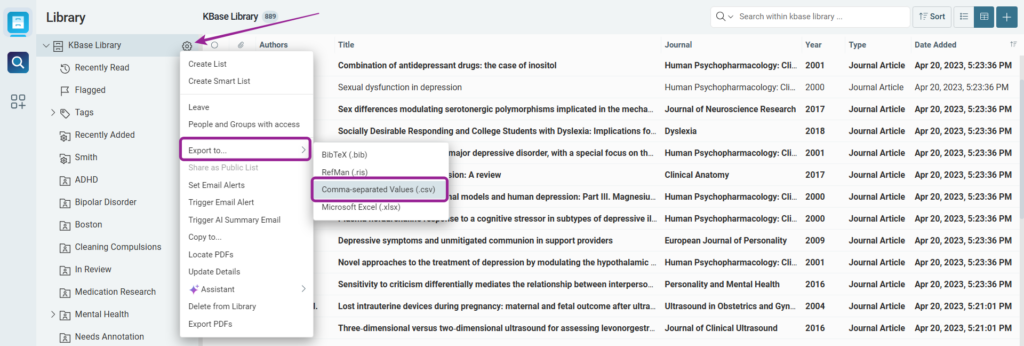
To export from Papers all you need to do is hit the gear next to a library and click export as “Comma-separated Values”. This will open up a dialog box that allows you to save the CSV to your computer and default to the library’s name. Once saved you can edit the file in excel or any other program to edit the CSV. You can then import this file back into the app to bulk update any of the items you had updated.
Updated on December 5, 2024

Was this helpful?

  • Happy
  • Normal
  • Sad

Share This Article :

  • Facebook
  • LinkedIn
Authors with multi-text namesAn Article Was Mislabelled as a Supplement (Or Vice Versa)
papers_logo_ds

Your centralized, smart reference library solution to dramatically improve the way you discover, organize, read, annotate, share, and cite your research.

ReferenceManagement_Leader_Leader
users-love-us
Support
  • Help Center
  • Submit a Ticket
  • Release Notes
  • Feature Requests
  • Reseller Portal
Training
  • Download Center
  • Getting Started
  • Training Center
  • Live Training
Resources
  • Blog
  • Papers vs ReadCube
  • Institutional Plans
  • Enterprise Options
  • SmartCite for Word
  • SmartCite for Google Docs
  • SmartCite for Citekeys
  • Supported Styles
Consent
  • Terms
  • Privacy
  • Security Statement
  • Data Protection
  • Cookie Policy
|   © 2026 Digital Science Research & Solutions Inc.
Scroll To Top