
ReadCube Papers Reseller: Frequently Asked Questions
Getting Started
Complete the registration form at readcube.wufoo.com/forms/reseller-registration-form. You must accept the reseller terms as part of registration. Once approved, you will receive access to your reseller dashboard.
Log in at papersapp.com/reseller. From your dashboard you can purchase licenses, request quotes, view your license history, manage admin agents, and download receipts — all in one place.
Yes. If you haven't logged in before, visit papersapp.com/reseller and create an account. If you forget your password, you can reset it from your profile page.
Both are accessible directly inside your reseller dashboard.
Purchasing Licenses
Use the self-checkout option in your dashboard. Payment is by credit card only. Once the order is complete, you will receive a confirmation and the license key will be sent to your registered email. All issued keys are also visible in the License History tab.
Registered resellers receive 10% off standard license prices. Orders of 50 or more licenses qualify for a 20% discount.
The following prices reflect the reseller discount (10% off standard pricing):
| Plan | 1 Year | 2 Year | 3 Year | |
| Papers Essentials | $58.50 | $117 | $175.50 | |
| Papers Pro | $117 | $234 | $351 |
You can view a full comparison of our available plans and their features at https://www.papersapp.com/pricing/
Use the "Request Quote" button in your dashboard. You'll be asked to provide:
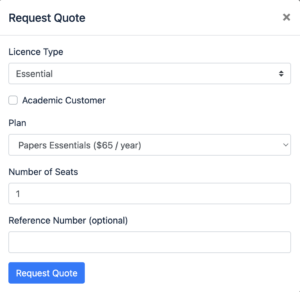
Quotes are generated immediately and are valid until the end of the year. All quotes are saved in your quote archive within the dashboard.
No. All orders must be paid by credit card through the reseller portal. We do not process purchase orders or issue separate invoices beyond the receipt generated at checkout.
Renewals follow the same process as new orders — purchase through the dashboard and the end user applies the new key to their account. There are no auto-renewals on reseller license keys, so we recommend tracking expiry dates in your Order history.
License Keys
License keys are delivered to your registered email immediately after payment is confirmed. All issued keys are also visible in the License History tab of your dashboard.
The end user visits readcube.com/account and clicks "Enter license key." If they don't have an account yet, they can create one at that step. Only one license key should be added per account. Once applied, the subscription status will update from Trial to "Subscription Credit."
The account will automatically downgrade if a new key is not applied before the existing license expires. Make sure end users are aware of their renewal dates.
License terms begin when the key is applied to the account and run for the duration purchased (1–4 years). Start and end dates for all licenses are visible in your License History.
Account & Admin Agents
As an admin, you can add and remove reseller agents directly from the Admins section of your dashboard profile.
You can edit your account name, address, and settings such as always forwarding all license keys to a designated email address. Contact [email protected] if you need help with other profile changes.
Billing & Receipts
All receipts are available to download by clicking on the individual purchase in your License History.
No. Receipts are sent to the reseller's registered email only. End users do not receive receipts.
Support & Other
Use the ReadCube Papers Contact link inside your dashboard, or reach out directly at [email protected].
Yes. For institutional or enterprise licensing, visit readcube.com/en/request-a-demo to get in touch with our team.